It is suitable for: N100RE, N150RH, N150RT, N151RT, N200RE, N210RE, N300RT, N301RT , N300RH, N302R Plus, A702R, A850, A3002RU |
Application:If you want to reset the router’s User Name and Password, please follow the steps below.
STEP-1:
Connect your computer to the router by cable or wireless, then login the router by entering http://192.168.0.1 into the address bar of your browser.

Note:The default access address varies depending on the actual situation. Please find it on the bottom label of the product.
STEP-2:
User Name and Password are required, by default both are admin in lowercase letter. Click LOGIN.

STEP-2:
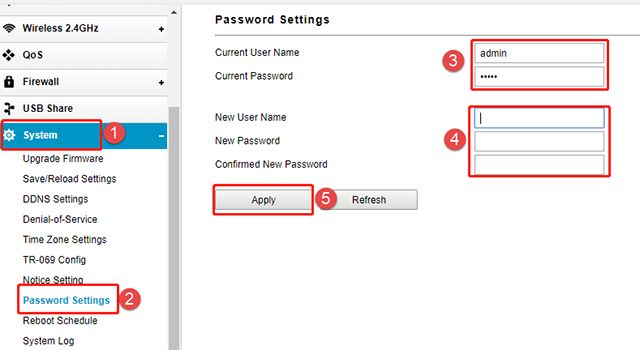
Click System->Password Settings on the navigation bar on the left. In this interface, you can change the password after entering the old password.The default user name and password is admin.